

Works with Google Meet + HubSpot. Setup in 3 minutes.
Stop losing deals
to what happens after the call.
Most deals don’t die in the meeting — they die in the silence after it. No follow-up sent. No objection logged. No next step defined. Klynt makes sure none of that falls through the cracks.

✔️ Works with:

How we help
Sales teams lose deals because of what happens after the call — not during it.
CRM notes get forgotten. Objections go untracked. Next steps are never logged. Your reps leave every meeting with good intentions and a blank HubSpot record.

Manual CRM updates eat hours every week
Reps spend 20–30% of their time logging calls, writing follow-up notes, and updating deal stages. That’s pipeline review time gone.

Managers can’t coach what they can’t see
Without a structured record of every call, coaching is guesswork. Deal reviews are based on what reps remember, not what was said.

At-risk deals are invisible until it’s too late
No defined next steps. No decision maker identified. No champion confirmed. These signals exist in your calls — they just never make it to your pipeline.

Klynt fixes all three — automatically
Every call gets recorded, analyzed, and synced to HubSpot without any manual input. Your pipeline reflects reality within minutes of hanging up.
How it works
From one call, three deliverables.
No forms. No notes. No CRM tabs. Klynt turns every sales call into rep coaching, deal intelligence, and a fully updated HubSpot — automatically.

Step 1
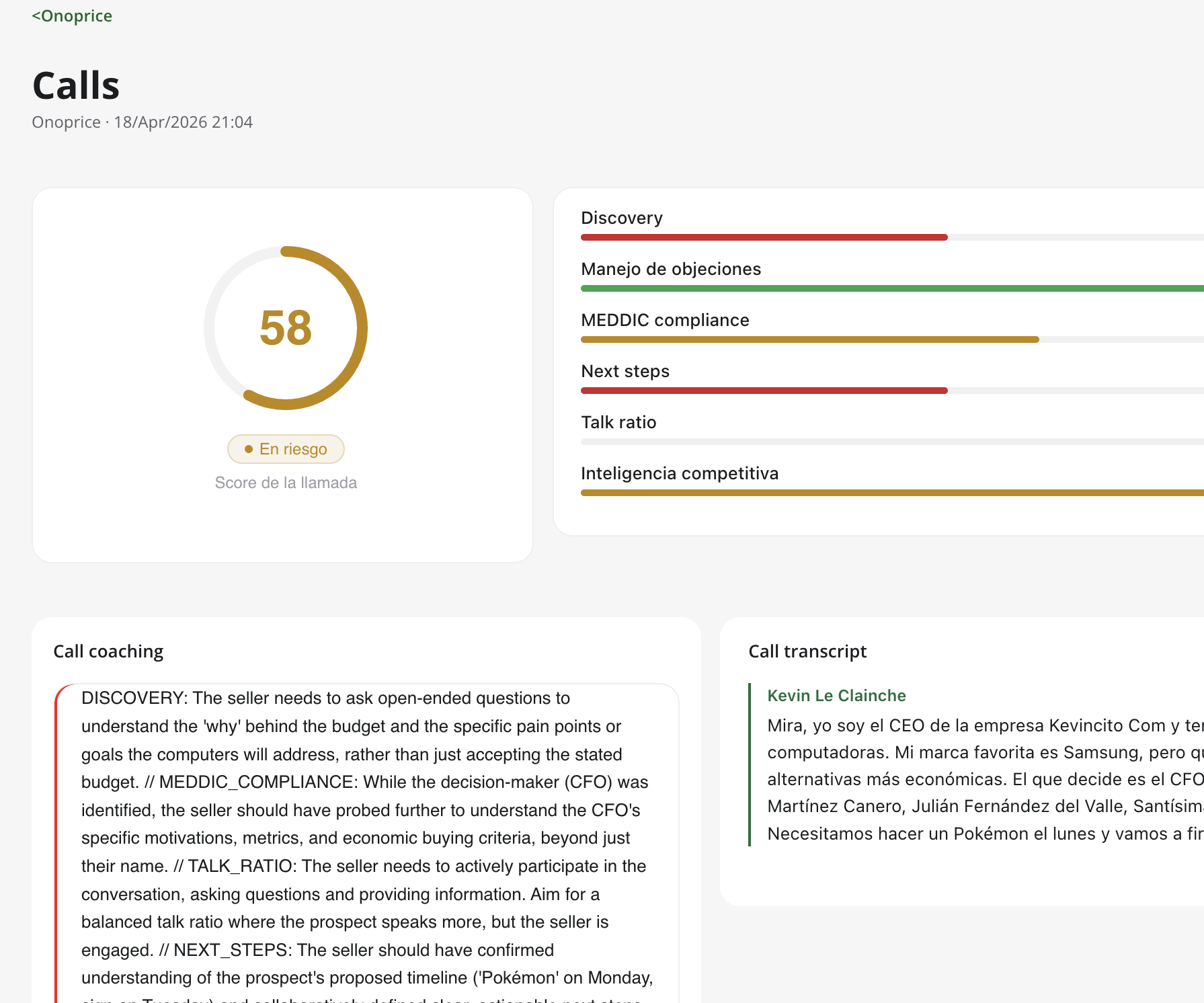
Call scoring & rep coaching
Every call gets a 0–100 score across the six dimensions that actually predict close rate — and specific coaching your reps can act on before the next meeting.
- Score breakdown: discovery, objection handling, MEDDIC, talk ratio, next steps, competitive positioning
- Personalized coaching per rep, not generic tips
- Full transcript with speaker diarization, searchable in seconds
- Objective, consistent criteria for every 1:1

Step 2
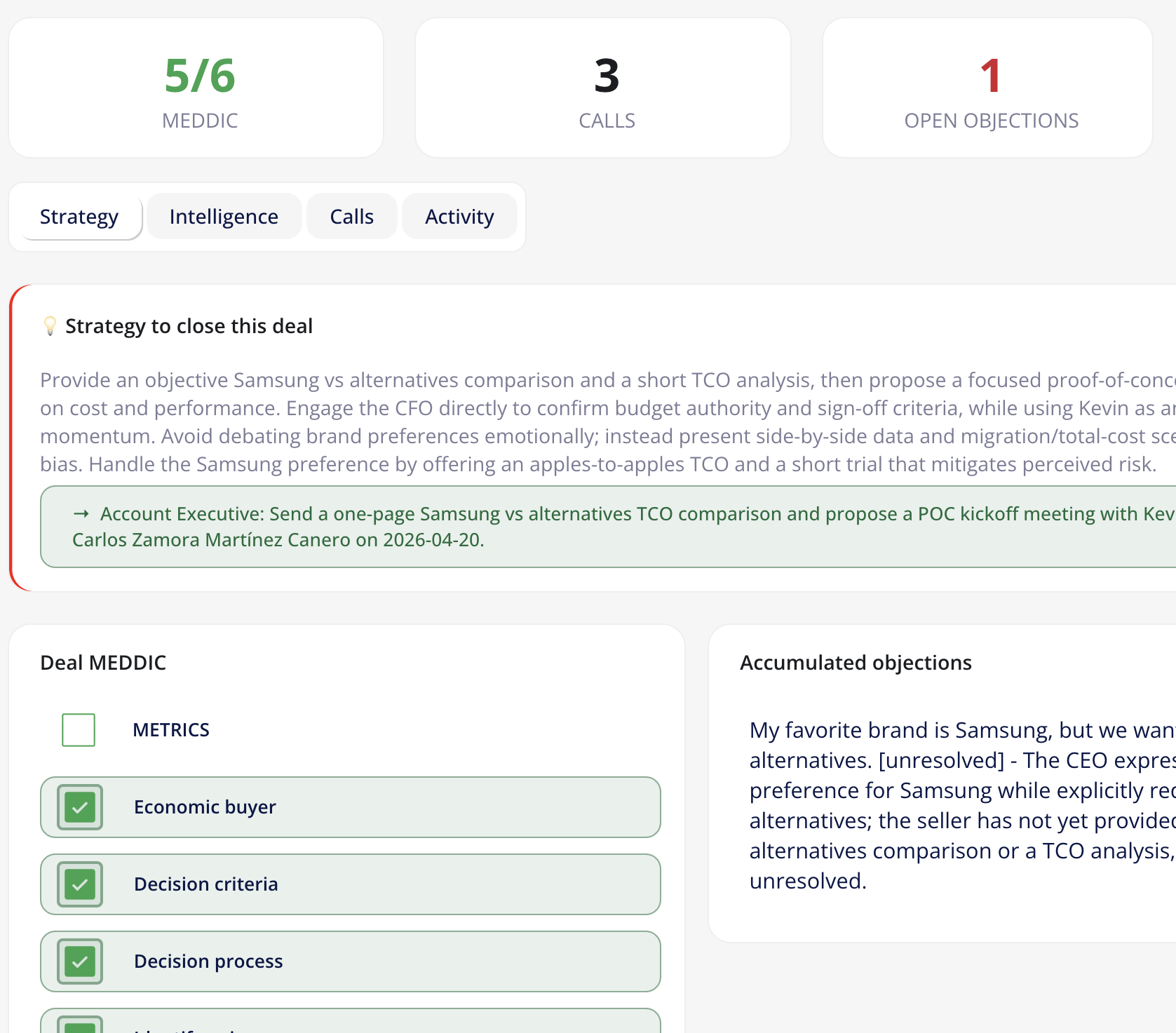
Deal intelligence that compounds
The second your call ends, HubSpot already reflects what happened. Your reps stop logging activity. Your pipeline stops lying to you.
- Risk level (green / yellow / red) updated after every call
- MEDDIC fields filled in automatically and refined over time
- Stakeholder map, competitors detected, objections tracked (open and resolved)
- Recommended strategy and the single next action that moves the deal
Step 3
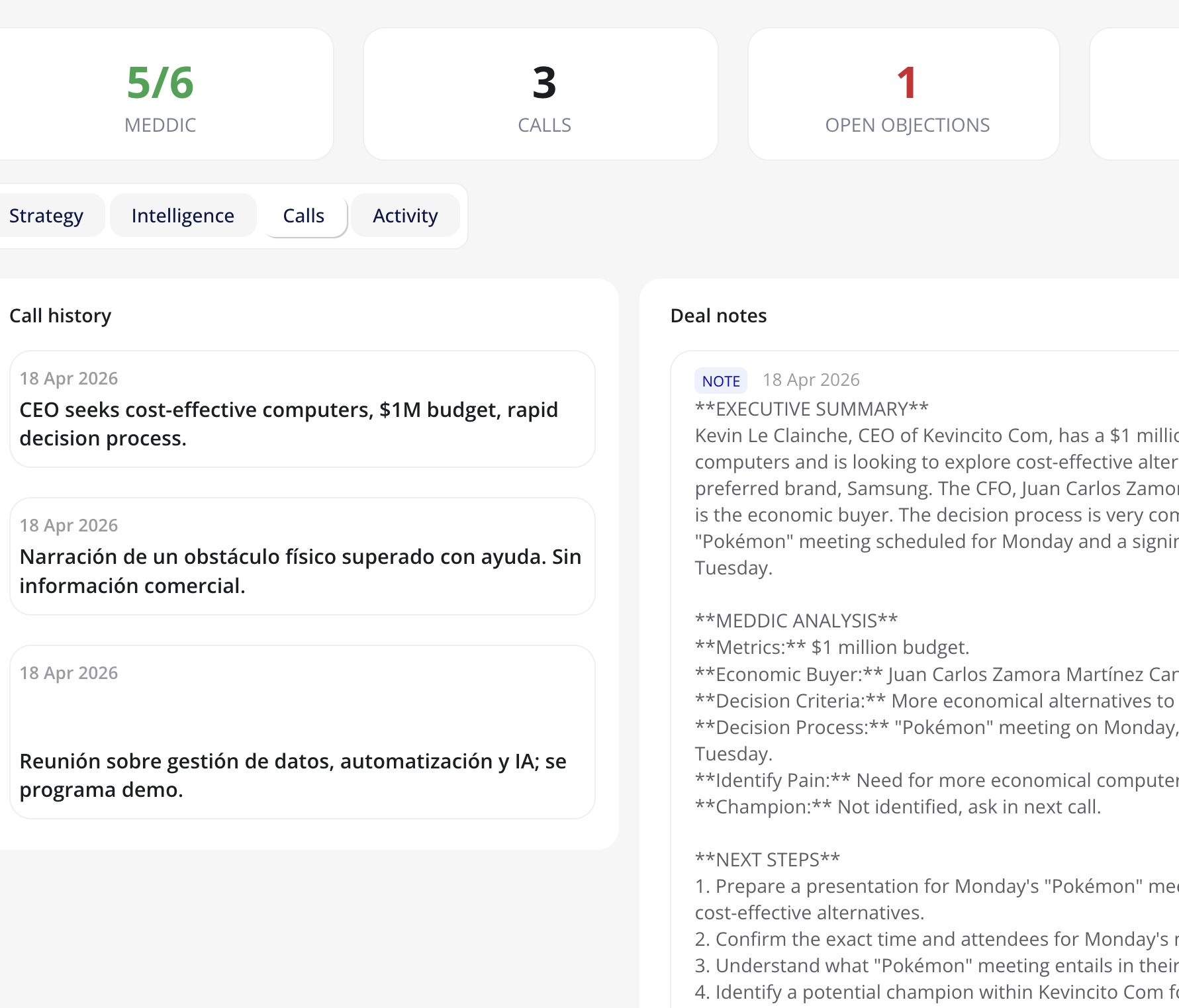
HubSpot, always up to date
A structured note with the call summary, a follow-up task, and an updated deal record — all synced to the right deal in HubSpot before you close your laptop.
- Detailed meeting note written and attached to the deal
- Follow-up task created with the concrete next steps
- Deal properties updated (stage signals, amount changes, close date shifts)
- Zero clicks from the rep — it’s done before they close the tab

Core features
Everything your team needs to turn every call into pipeline progress

Automatic call recording & transcription
Klynt’s bot joins your Google Meet calls and produces a full transcript with speaker diarization — no human intervention needed.

MEDDIC analysis + 6-dimension call scoring
Every call is analyzed using the MEDDIC framework and scored across six dimensions that predict deal health and rep performance.

Deal Intelligence — accumulated per deal
Klynt tracks stakeholders, objections, competitors, and deal evolution across every call — building a living intelligence record.

Automatic HubSpot sync
Call summaries, tasks, and deal updates are pushed to the right HubSpot deal automatically — matched by the Google Meet URL on the calendar event.

Inline call video playback
Watch any recorded call directly inside Klynt — no switching tabs, no downloading files. Video is fetched on demand so links never expire.

Built for teams — multi-user by design
Each team gets its own isolated workspace. Managers and reps share data without ever seeing another team’s pipeline.
FAQ
Common questions
No — Klynt’s bot joins as a named participant (“Klynt Assistant”) that is visible to everyone on the call. We recommend letting participants know calls may be recorded, in line with best practices and applicable laws in your country. You can also configure exactly which meetings should be recorded.
Today, Klynt supports Google Meet exclusively. Zoom support is on the roadmap for later in 2026. If Zoom or Teams is a hard requirement for your team, join the waitlist and we’ll notify you when it’s available.
No custom properties or HubSpot configuration required. Klynt connects via standard HubSpot OAuth. The only requirement is that your Google Calendar events include the HubSpot-linked Google Meet URL so Klynt can match the call to the right deal.
Recording and transcription infrastructure runs on Recall.ai’s EU region (eu-central-1). Your data is processed with OpenAI’s API under a data processing agreement. Each customer’s data is fully isolated — no team can access another team’s calls, transcripts, or deal information.
Yes. The AI analysis is powered by GPT-4o and 10 different languages — including regional variations. The transcript, summary, and deal intelligence output will mirror the language of your call.
Klynt will still record, transcribe, and score the call. The analysis and transcript are saved in your Klynt dashboard. The HubSpot sync steps are simply skipped for that call — no errors, no data loss.
Under 5 minutes. Connect your Google Calendar, connect HubSpot via OAuth, and Klynt starts monitoring your meetings immediately. No RevOps needed, no custom CRM fields, no developer involvement.
Yes. By default, Klynt records confirmed external meetings that include a Google Meet link. You can also toggle individual meetings on or off directly from the dashboard without affecting your global recording settings.